
A Pay-As-You-Go Typeform Alternative: One Meter Instead of Three
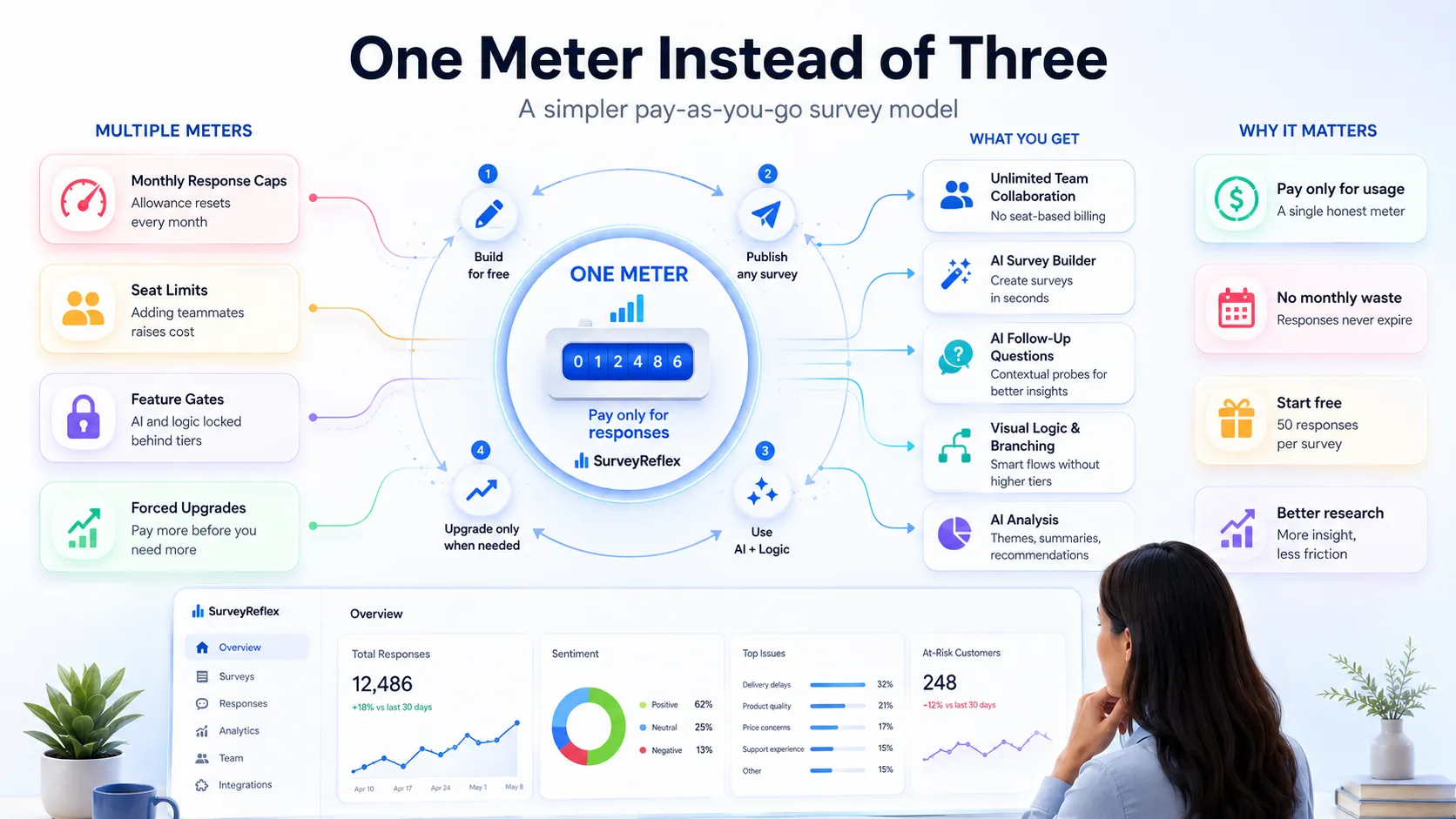
Typeform makes beautiful surveys. That has never been the complaint. The complaint is that it meters you in three separate directions at once — responses per month, seats on the plan, and which features your tier is allowed to touch — and you can hit any one of those walls in the middle of a project you’ve already started.
The third meter is the one that stings. You can be paying every month and still find that the branching logic you need, or the AI that would have written your first draft, sits one tier above where you are. According to Typeform’s own pricing page, its free plan carries no AI capability at all, and logic starts on the paid plans. The tool isn’t missing those things. Your plan is.
The three meters, and why only one of them is really about usage
A response cap is a fair meter. You’re collecting data, the platform is storing and processing it, and the cost tracks the work. Reasonable.
The other two meters don’t track work at all. A seat limit charges you for the existence of a colleague — the same survey, the same responses, just a second person able to open it. A feature tier charges you for permission to use software that has already been built and is already running on the servers you’re paying for. Neither one costs the vendor more when you cross it.
That distinction matters because it changes what “upgrading” means. When you cross a response cap, you’re buying more of the thing you’re actually using. When you cross a seat limit or a feature gate, you’re buying the removal of a restriction.
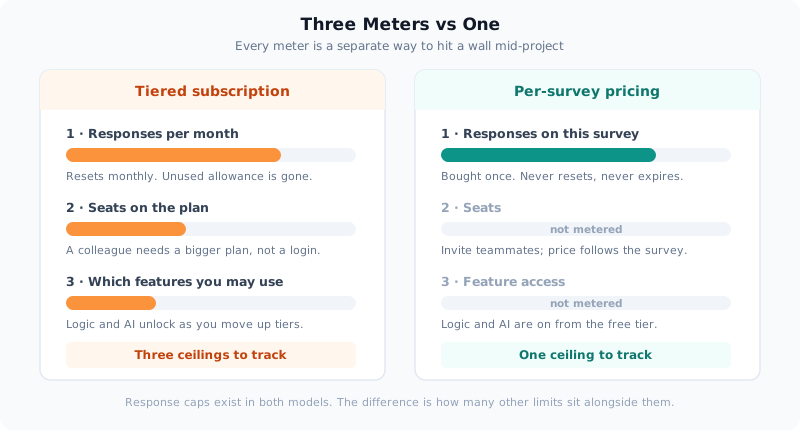
SurveyReflex keeps the response meter — that one is honest — and drops the other two entirely.
Adding a colleague shouldn’t require a bigger plan
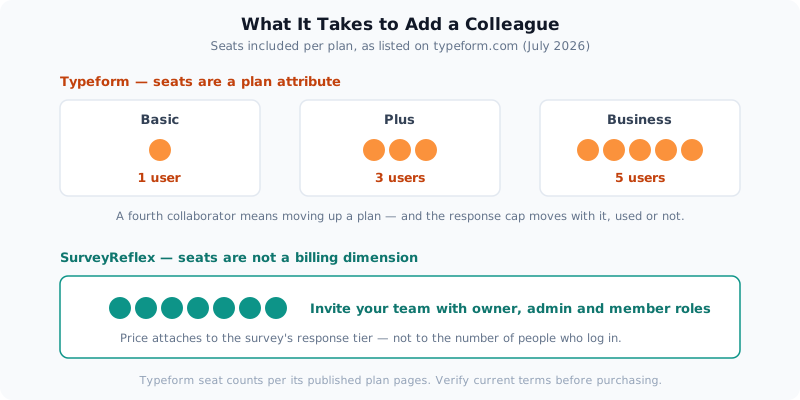
Typeform’s published plans include a fixed number of users: Basic includes 1 user, Plus includes 3, and Business includes 5, per its plan pages. Those seat counts are bundled into the tier, which produces an awkward result — the fourth person who needs access pushes you onto a plan whose response allowance also jumps, whether or not you needed more responses.
Think about what that actually looks like. A three-person marketing team running modest surveys wants to bring in a designer to review the survey styling. Nothing about the research changed. The volume didn’t change. The bill did.
SurveyReflex doesn’t price seats. You can create a team, invite people by email, and assign owner, admin and member roles with different permissions — and none of that touches what you pay. Price attaches to a survey’s response tier, so the question “can we afford to add someone?” simply doesn’t arise.
The seat meter is the one people notice on the invoice. The feature meter is the one that shapes what your surveys can actually do.
Monthly allowances reset — your research schedule doesn’t
Typeform’s response limits are expressed per month across all its standard plans. That’s the right structure for a form that runs continuously, like a lead capture form on a landing page, where every month genuinely produces new submissions.
It fits badly for research, which arrives in bursts. A quarterly customer survey means you’re paying for twelve monthly allowances and using three of them. Unused responses don’t roll forward; the meter zeroes out and starts again. And because the cap is monthly rather than per survey, a single unexpectedly successful survey can exhaust the month’s allowance for everything else you had planned.
SurveyReflex’s tiers are attached to a survey, not a calendar month. You buy responses for that survey — $3 for 100, $7 for 500, $13 for 1,000, up to $45 for 5,000 — and per the pricing documentation, those responses “never expire and are not tied to any billing cycle.” A survey you publish in March is still collecting against the tier you bought for it in November.
Below all of that sits a free tier of 50 responses per survey, on unlimited surveys, with no card required. Not a trial — a permanent floor.
That matters more than it sounds, because of what’s included at that floor.
Every AI feature works on the free tier
This is the part worth being specific about, since “has AI” means very little on its own.
AI survey creation. Describe what you need in up to 1,000 characters — “a post-conference feedback survey covering session quality, speaker ratings and venue facilities” — and AI generates the survey: title, description, and questions with appropriate types already selected, up to around 15 questions. It’s fully editable afterwards; the point is skipping the blank page, not outsourcing your judgement.
AI follow-up interview questions. A respondent gives your onboarding two stars. Instead of a generic “please explain,” AI reads their actual answer and asks one contextual probe — “what was the most frustrating part of getting started?” — generated live, mid-survey. It works on text, star rating, numeric scale, opinion scale, NPS and yes/no questions. Respondents can skip it, and if it can’t generate for any reason the survey just continues, so it never blocks a submission. Up to two questions per survey can carry a follow-up, each producing at most one probe per respondent.
AI analysis. Once responses land, AI Analysis summarises the results, identifies themes, and produces recommendations — and you can ask it direct questions about your own data (“what are the top 3 complaints mentioned in the feedback?”), or have it suggest questions worth asking. Results export to PDF.
Visual logic and branching. The Logic tab is a map, not a form. Every question is a card; you drag from one card to another to draw a jump, then set the condition that triggers it. Each question supports up to 8 jump rules with up to 3 AND conditions each, plus show/hide rules that reveal a question only when an earlier answer qualifies. Arrows are colour-coded — teal for jumps, grey for the default path, dashed for show/hide, and red for a broken rule pointing at a deleted question, so you can spot problems before publishing rather than after.
None of these are tier-gated. SurveyReflex’s plans are counted in responses and nothing else, which means a free survey collecting 40 responses has the same AI and the same logic engine as a $45 one.
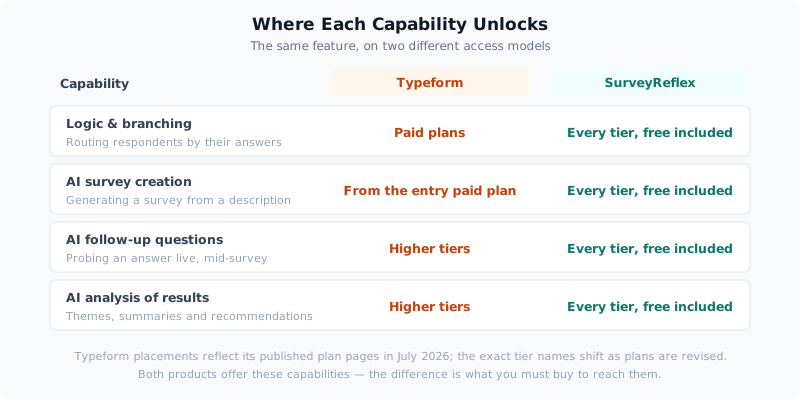
Typeform offers comparable capabilities — AI-powered form creation on its paid plans, and deeper AI such as Clarify with AI and Smart Insights higher up the range. The difference isn’t whether the capability exists. It’s what you have to buy to reach it.
The follow-up question is where surveys stop being forms
Worth dwelling on, because it changes the quality of what you learn.
A rating question tells you what. It almost never tells you why. The standard workaround is bolting a “please explain your answer” text box underneath, which produces exactly the response quality you’d expect — blank, or “good,” or “n/a” — because the question is generic and the respondent knows it.
A follow-up generated from the specific answer someone just gave reads as though a person is listening. Someone who rated onboarding 2 gets asked about frustration; someone who rated it 5 gets asked what worked. Same survey, different conversation, and the open-text you get back is worth reading.
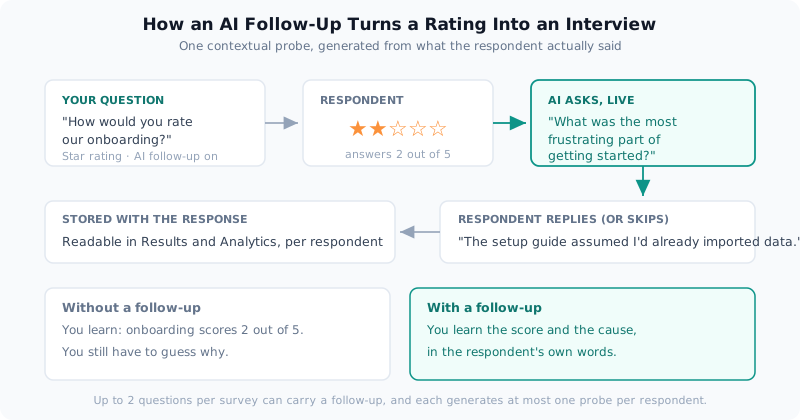
Ten sharp answers about why beat two hundred rows telling you only what. This is also where the free tier stops being a demo: fifty responses with real follow-up interviews attached is a genuine piece of research.
Where Typeform is still the better choice
An honest comparison has to include this, and there are real cases.
- Conversational, one-question-at-a-time design is Typeform’s craft. If the survey experience is part of your brand — a customer-facing quiz, a polished lead-gen flow — that presentation is what you’re paying for, and it’s very good.
- Always-on forms genuinely fit monthly pricing. A form embedded on a high-traffic page collecting submissions every day of the month uses the allowance it’s billed for. That’s the model working as designed.
- A large, mature integration catalogue. Typeform has spent years building connectors. If your workflow depends on a specific one, check for it before moving. SurveyReflex covers Zapier and API access, which reaches a lot but not everything.
- Very high volume. SurveyReflex’s self-serve tiers stop at 5,000 responses per survey; above that it’s a conversation with sales rather than a checkout page.
If none of those describe you, the maths is straightforward: you’re paying a monthly subscription, seat by seat and tier by tier, for surveys that run a few times a year.
How SurveyReflex helps
The design principle is a single sentence: building is always free, and you pay once, per survey, only when you need real volume. Draft as many surveys as you like at no cost. Publish them and collect 50 responses each, still at no cost. When one needs more, buy its response tier — and that purchase never renews, never expires, and never needs cancelling. If a live survey approaches its limit you’ll be warned at 75%, 90% and 100%, and you can upgrade its tier from the Publish tab without losing a single response already collected.
The practical test costs nothing: build a survey with AI, wire up a branch or two in the Logic tab, switch on an AI follow-up for your most important question, publish it, and read what comes back. If it doesn’t earn a paid tier, you haven’t spent anything.
Typeform plan structures described here — per-month response allowances, included seat counts, and which tiers carry logic and AI — reflect its published pricing pages in July 2026. Listed prices vary by billing period and change periodically, so check typeform.com/pricing for current figures rather than relying on any number quoted in a blog post. SurveyReflex pricing is documented in full under Pricing & Plans.
Try SurveyReflex free — pay only when you need more than 50 responses.
— The SurveyReflex Team