
A SurveyMonkey Alternative With No Subscription: An Honest 2026 Comparison
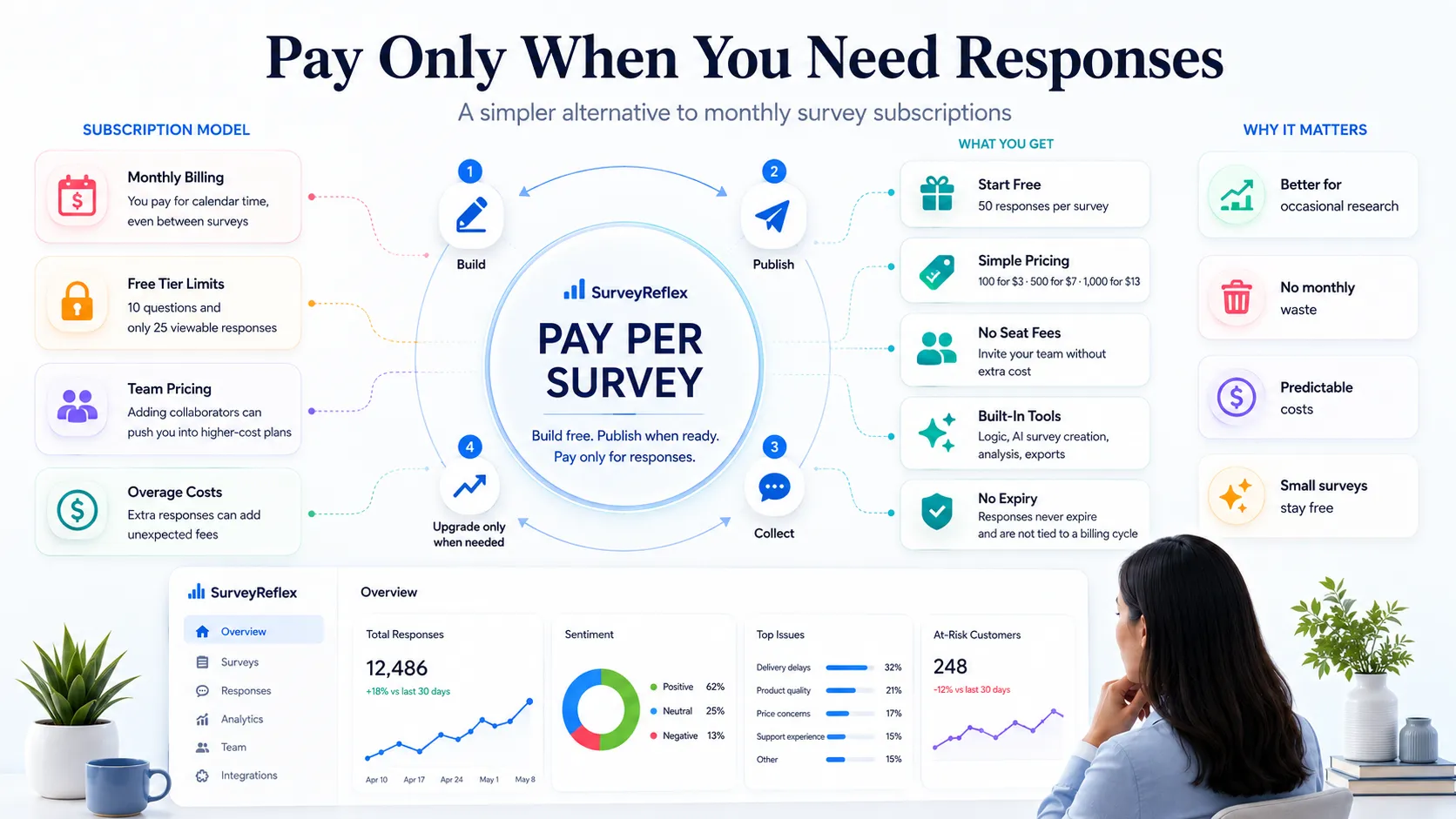
Most people who search for a “SurveyMonkey alternative” are not unhappy with the software. They are unhappy with the invoice — specifically, with paying every month for a tool they open three or four times a year.
That mismatch has a number attached to it. As of July 2026, the only individual SurveyMonkey plan you can buy month to month is Standard, listed at $99/month. If you run one survey in March and nothing until October, that single survey costs you $99 — or $792 if you leave the plan running in between. The survey didn’t get more valuable. The calendar just kept moving.
What people actually mean by “alternative”
Dig into the complaint and it’s almost never about question types or reporting. It comes down to three specific mechanics:
- The billing trigger is time, not work. You’re charged for owning access, not for collecting responses.
- The free tier stops right before it’s useful. SurveyMonkey’s free Basic plan allows up to 10 questions per survey, and free users “must upgrade to view responses in excess of the response limit” — listed as 25 responses per survey. You can gather the data. You just can’t read it.
- Collaboration has a floor price. SurveyMonkey’s individual plans include one user. Team plans start at three users and bill annually, so adding a second person is not a small step — it’s a plan change with a three-seat minimum.
None of that is a design flaw. It’s a deliberate model, and it works well for organisations running continuous research. It fits badly for everyone whose survey activity comes in bursts.
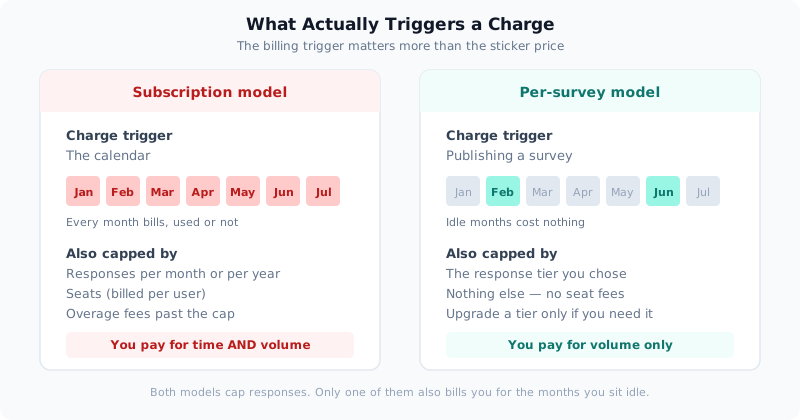
The distinction that matters isn’t the sticker price — it’s what event causes money to leave your account.
SurveyMonkey’s 2026 pricing, as published
Here is what the official pricing pages listed in July 2026. Prices change, promotions run, and regional taxes apply, so treat this as a snapshot and verify before you buy.
| Plan | Price | Billing | Responses included | Users |
|---|---|---|---|---|
| Basic (free) | $0 | — | 25 viewable per survey, 10 questions max | 1 |
| Standard | $99/month | Monthly | 1,000 per month | 1 |
| Advantage | $46/month ($552/year) | Annual | 15,000 per year | 1 |
| Premier | $139/month ($1,668/year) | Annual | 40,000 per year | 1 |
| Team Advantage | $30/user/month | Annual, 3+ users | 50,000 per year | 3+ |
| Team Premier | $92/user/month | Annual, 3+ users | 100,000 per year | 3+ |
Two details are easy to miss and both cost money. First, the genuinely affordable individual tiers are annual only — the flexibility of monthly billing carries a premium of roughly $53/month over Advantage. Second, going past your allowance is billed at $0.15 per additional response, so a survey that overshoots by 500 replies adds $75.
For comparison, SurveyReflex charges nothing per month and nothing per seat. You pay once, per survey, for the responses you want:
| Tier | Responses | Price |
|---|---|---|
| Free | 50 per survey, unlimited surveys | $0 |
| Starter | 100 | $3 |
| Essentials | 500 | $7 |
| Growth | 1,000 | $13 |
| Pro | 2,000 | $23 |
| Business | 5,000 | $45 |
Above 5,000 responses on a single survey, SurveyReflex becomes a conversation with sales rather than a checkout page — a real limitation worth knowing before you switch.
The numbers on three real usage patterns
Averages hide the effect. Specific patterns show it. In each case below, the cheapest available SurveyMonkey route is used — no straw man.
A one-off survey, 400 responses. You need this once. SurveyReflex: the Essentials tier, $7, paid once. SurveyMonkey: the smallest viable route is one month of Standard at $99, assuming you remember to cancel.
Quarterly research, 4 surveys a year at 800 responses each. SurveyReflex: the Growth tier covers 1,000 responses, so 4 × $13 = $52/year. SurveyMonkey: subscribing to Standard only in the four active months costs 4 × $99 = $396/year. Advantage at $552 would cover the volume with room to spare but costs more for this pattern.
An always-on programme, 1,000 responses every month. SurveyReflex: 12 × $13 = $156/year. SurveyMonkey: Advantage at $552/year covers 15,000 responses annually and is far cheaper here than paying Standard monthly ($1,188).
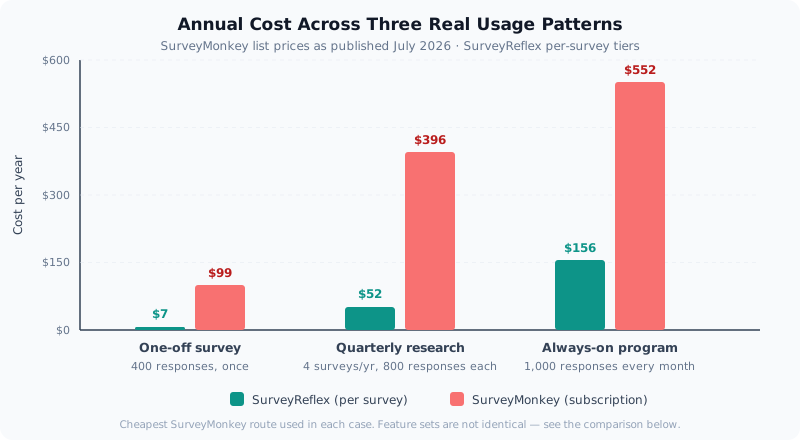
Notice that the gap narrows as usage becomes more continuous. That is the honest shape of this comparison: per-survey pricing wins hardest at the low and irregular end, and the advantage compresses as you approach genuine everyday use.
Team maths deserves its own line. Three colleagues who need access push you to Team Advantage: 3 × $30 × 12 = $1,080/year minimum. That plan includes 50,000 responses annually, which is genuinely a lot — but you’re buying it because you needed a second and third login, not because you needed the volume. SurveyReflex attaches price to the survey rather than the person, so team members don’t carry a seat fee.
The free tier is where most people hit the wall
Free plans are how everyone evaluates a survey tool, so their limits shape the decision more than the paid tiers do.
SurveyMonkey’s Basic plan caps surveys at 10 questions and shows you 25 responses per survey before requiring an upgrade. That’s enough to confirm the product works and not much else — a 12-question employee check-in doesn’t fit, and a survey sent to 200 people leaves 175 replies sitting behind a paywall.
SurveyReflex’s free tier is capped by responses instead: 50 responses per survey, on unlimited surveys, with no card required. The tiers are counted in responses only. When you cross 50, the next step is $3 for that one survey — not a plan.
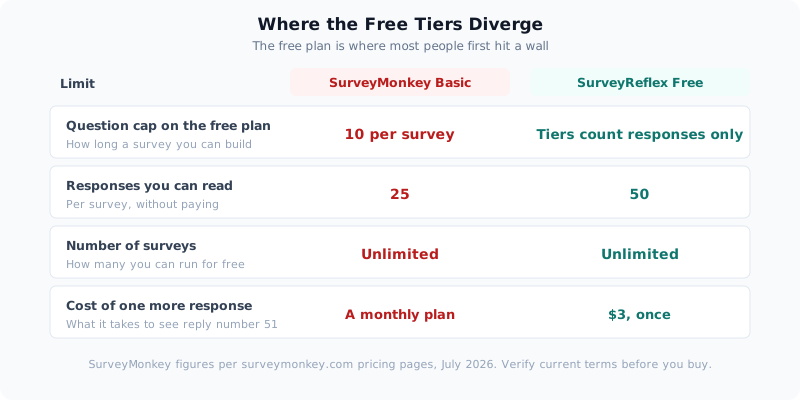
The practical difference: on one model the free tier is a demo, on the other it’s a working tool for small surveys you never pay for.
What you keep, and what you give up
A cheaper tool that can’t do the job isn’t cheaper. Here’s a fair accounting.
What carries over. SurveyReflex covers the standard research toolkit — 23 question types including matrix grids, ranking, opinion scales and a dedicated NPS question that calculates your score automatically; conditional logic and branching; themes and custom design; email invitations, links and website embeds; CSV, Excel and PDF exports; teams with owner, admin and member roles; and Zapier plus API access. There are also AI features SurveyMonkey users tend to notice — generating a survey from a description, AI follow-up questions that probe a respondent’s answer in the moment, and AI analysis of open-text responses.
What you give up. Three things, stated plainly:
- No respondent panel. SurveyMonkey sells access to a paid audience you can buy responses from. SurveyReflex has no equivalent — you bring your own list, customers, or traffic.
- A smaller integration catalogue. SurveyMonkey has been building connectors for two decades. If your workflow depends on a specific niche integration, check for it before you move.
- Enterprise procurement machinery. SSO, formal compliance packages, and dedicated account management are where a mature enterprise vendor earns its price. If your security review requires them, that’s a legitimate reason to stay.
Who should stay on SurveyMonkey
Switching for its own sake is a waste of an afternoon. Stay where you are if any of these are true:
- You need a paid respondent panel to reach people outside your own audience.
- Your organisation requires SSO, formal compliance documentation, or vendor review sign-off.
- You collect well over 5,000 responses on individual surveys and want self-serve checkout rather than a sales conversation.
- Your team runs research continuously and already extracts full value from the plan every single month.
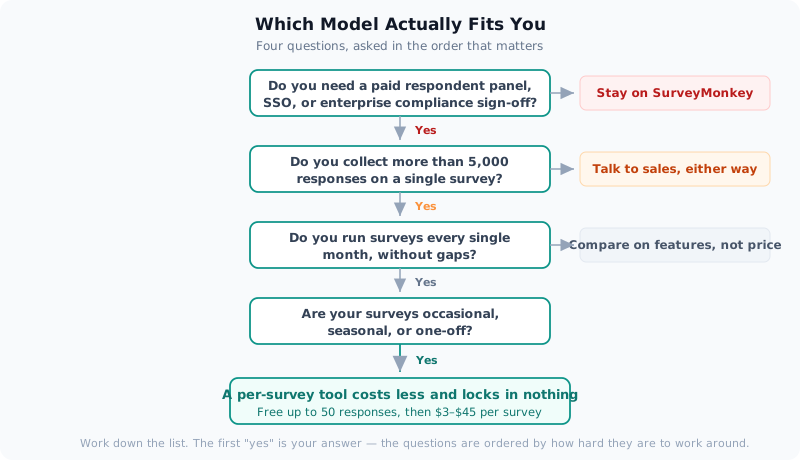
Work down that list and take the first “yes” as your answer. The questions are ordered by how hard each one is to work around.
Moving a survey across takes an afternoon
Migration is less work than people expect, because surveys are small artefacts.
- Export your historical responses first. Do this while your existing plan is still active — download the raw data for every survey you care about, and store it somewhere you control. This is worth doing regardless of whether you switch.
- Rebuild your two or three recurring surveys, not all of them. Most teams have a handful of surveys they actually rerun. Rebuild those; archive the rest as exported data. Or start from a template and adapt.
- Test with the free tier before spending anything. Publish, send it to a few colleagues, and check the logic and analytics on real submissions. Fifty free responses is plenty to validate a survey properly.
- Cancel deliberately, not automatically. Confirm the new setup handles a full cycle first — including exports and whatever reporting your stakeholders expect — then cancel.
The one thing that doesn’t transfer is historical trend continuity inside a single tool. If you track NPS quarter over quarter, keep the exported history in a spreadsheet so your baseline survives the move.
How SurveyReflex helps
SurveyReflex was built around one decision: you should be able to build a survey without paying, and pay only when you’re ready to collect real volume. Drafting is free. Publishing is free up to 50 responses per survey, across as many surveys as you like. When a survey needs more, you buy responses for that survey — $3 for 100, $13 for 1,000 — and that purchase never renews, never expires, and never has to be cancelled.
If a survey outgrows its tier mid-flight, you upgrade it from the Publish tab and every response already collected stays intact. Notifications warn you at 75%, 90% and 100% of your limit, so you’re not discovering the cap from a respondent complaining that the link stopped working.
It won’t replace an enterprise research platform, and it isn’t trying to. It replaces the monthly bill you’ve been paying for a tool you use four times a year.
Pricing for SurveyMonkey in this article reflects publicly listed figures on surveymonkey.com as of July 2026 and may change — check their pricing page before purchasing. SurveyReflex pricing is documented in full under Pricing & Plans.
Try SurveyReflex free — pay only when you need more than 50 responses.
— The SurveyReflex Team